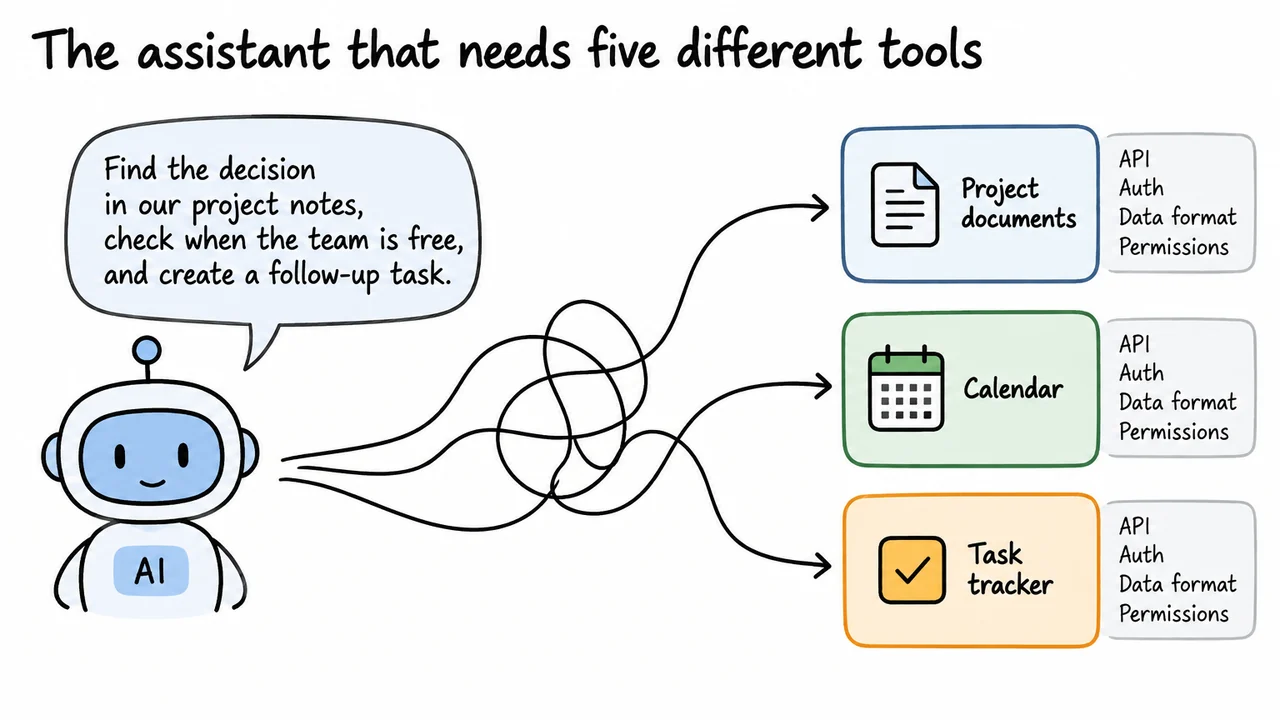
Imagine asking an AI assistant: “Find the decision in our project notes, check when the team is free, and create a follow-up task.” To a person, that sounds like one request. To software, it crosses several boundaries: the project notes live in one system, the calendar in another, and the task tracker in a third. Each system may have its own way to search, authenticate a user, represent data, and decide what that user is allowed to do.
An AI model can understand the request and plan the steps, but that does not automatically give it a safe, working connection to those services. The surrounding application needs code that can communicate with each one, interpret its responses, and handle failures. If the assistant is allowed to create tasks, the application also needs to control when that action is permitted.
This becomes especially awkward when a second assistant needs the same services. Developers may end up rebuilding similar connections, handling the same authentication quirks, and updating separate pieces of code whenever a service changes. The user sees one chat window; behind it may be a collection of unrelated integrations.
The underlying question is simple: can AI applications and external systems agree on a common way to expose and use capabilities? That is the problem the Model Context Protocol, or MCP, is designed to address.
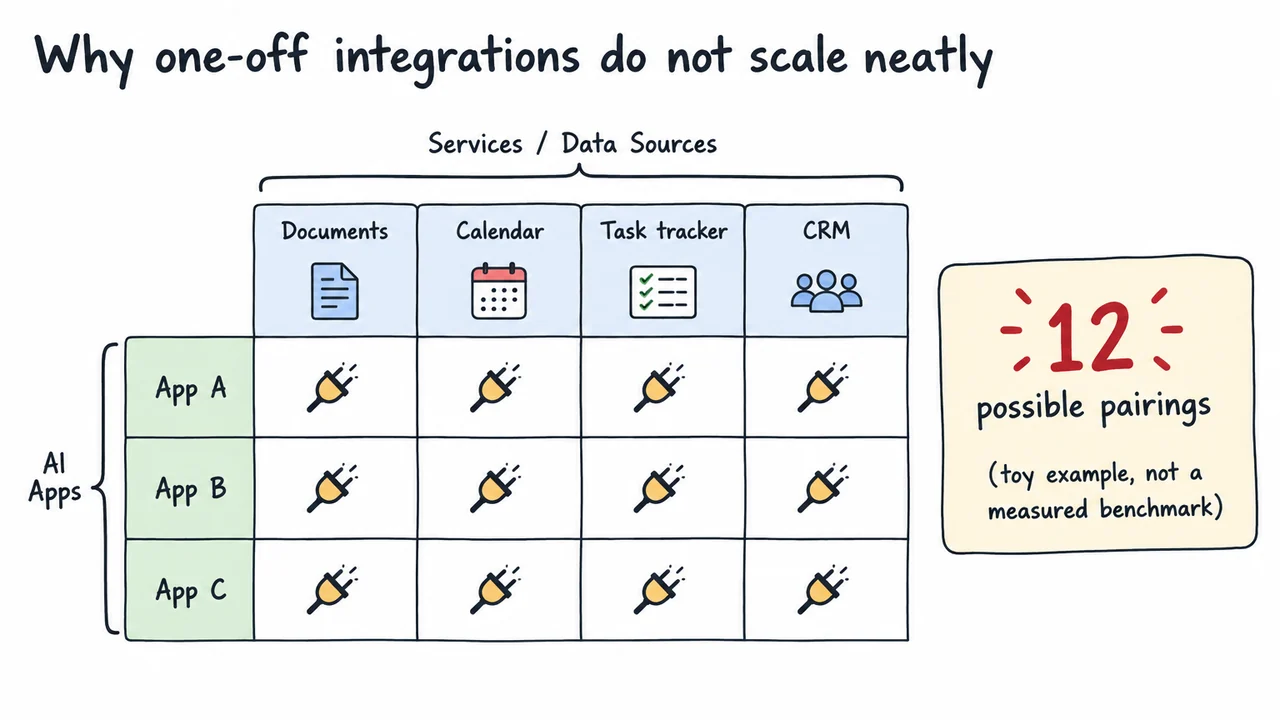
The integration work grows as we add more assistants and services. Consider a deliberately small example: three AI applications each need access to four services. If every app-service pairing is implemented separately, there are up to twelve pairings to build or maintain. This is just a count of possible connections, not a measurement of engineering effort; some pairings may share code, and some may be much more complicated than others.
The difficulty is not merely the number of connections. One service might use an API key, another might require a user sign-in, and a third might return information in a different structure. A developer has to map each service's behavior into the application that consumes it. When the service changes, every integration that depends on the changed behavior may need attention.
A shared protocol can reduce duplicated connection logic by giving compatible applications a common way to discover and call capabilities. Instead of each AI app needing a wholly different interface for every tool provider, the app can speak the shared protocol to a server that exposes that provider's functionality.
That does not make integration work disappear. Someone still has to build and operate each server, connect it to the underlying system, and configure permissions. The benefit is that the communication pattern can be reused across compatible clients, rather than reinvented for every pairing.
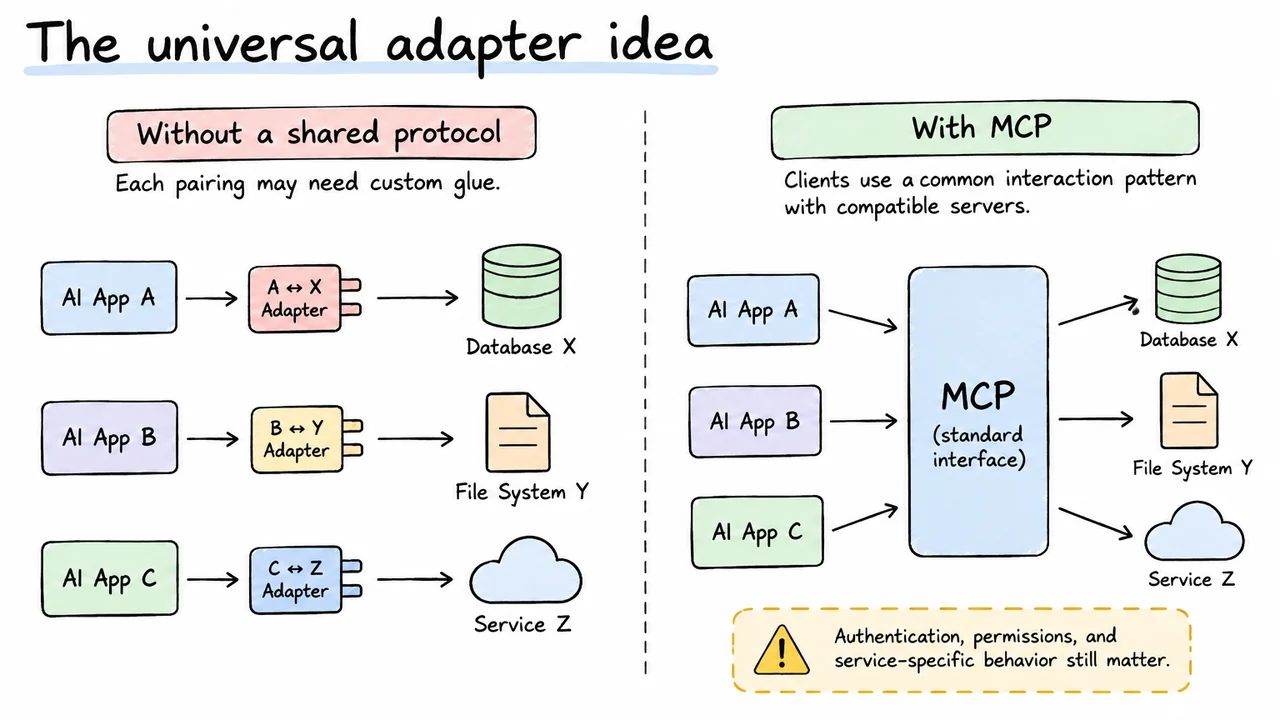
A useful everyday analogy is a common plug standard. If every appliance and wall socket used a different shape, people would need a different adapter for each combination. A shared standard lets compatible devices connect without requiring every manufacturer to coordinate separately with every other manufacturer.
MCP aims for a similar kind of agreement in software. An AI application can use an MCP client to communicate with an MCP server through a defined protocol. The server exposes capabilities—such as searching a document collection or creating a task—in a form the client can discover and request. If another compatible AI application supports the same protocol and capability conventions, it may be able to use that server without a brand-new, app-specific communication layer.
The analogy is helpful, but it has limits. Software capabilities are not interchangeable just because they use the same protocol. One task server may support creating tasks with due dates and owners; another may not. The host application still needs to understand what a tool does, and the connected service still enforces its own data model and permissions. Authentication and security also require real implementation choices.
So MCP is best understood as a shared communication standard, not a magic adapter that makes every service automatically compatible. To see what that standard actually defines, we need to look at the roles and capability types involved.
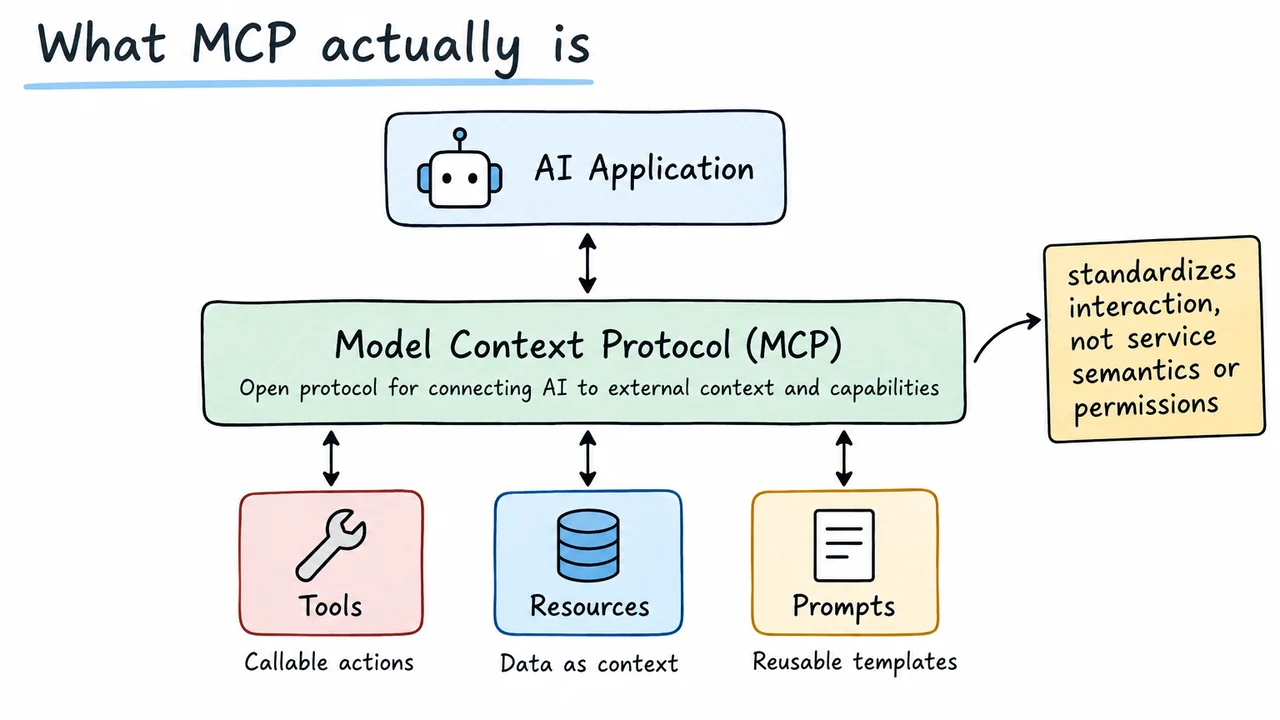
The Model Context Protocol (MCP) is an open protocol that standardizes how AI applications connect to external context and capabilities. A protocol is an agreed set of rules for communication: it describes the kinds of messages participants can exchange and what those messages mean. MCP provides common conventions for discovering and using capabilities exposed by compatible servers.
Three capability types are especially useful to recognize. Tools let an application request an action or computation, such as searching a system or creating a task. Resources represent data that can be retrieved for context, such as a document or project record. Prompts let a server offer reusable prompt templates or workflows. The precise capabilities available depend on what a particular server implements and what the host application supports.
MCP is not the AI model itself, nor is it a replacement for a database or the service being connected. A server may use an existing API or local functionality to do its work. MCP standardizes the interface used by the client and server; it does not force every connected service to use the same internal design or business rules.
It also does not guarantee safe behavior. A server can expose sensitive data or actions, so an application still needs appropriate permissions, user approval where suitable, and careful handling of returned information. The protocol gives components a common way to communicate; it does not remove the need to design the system responsibly.
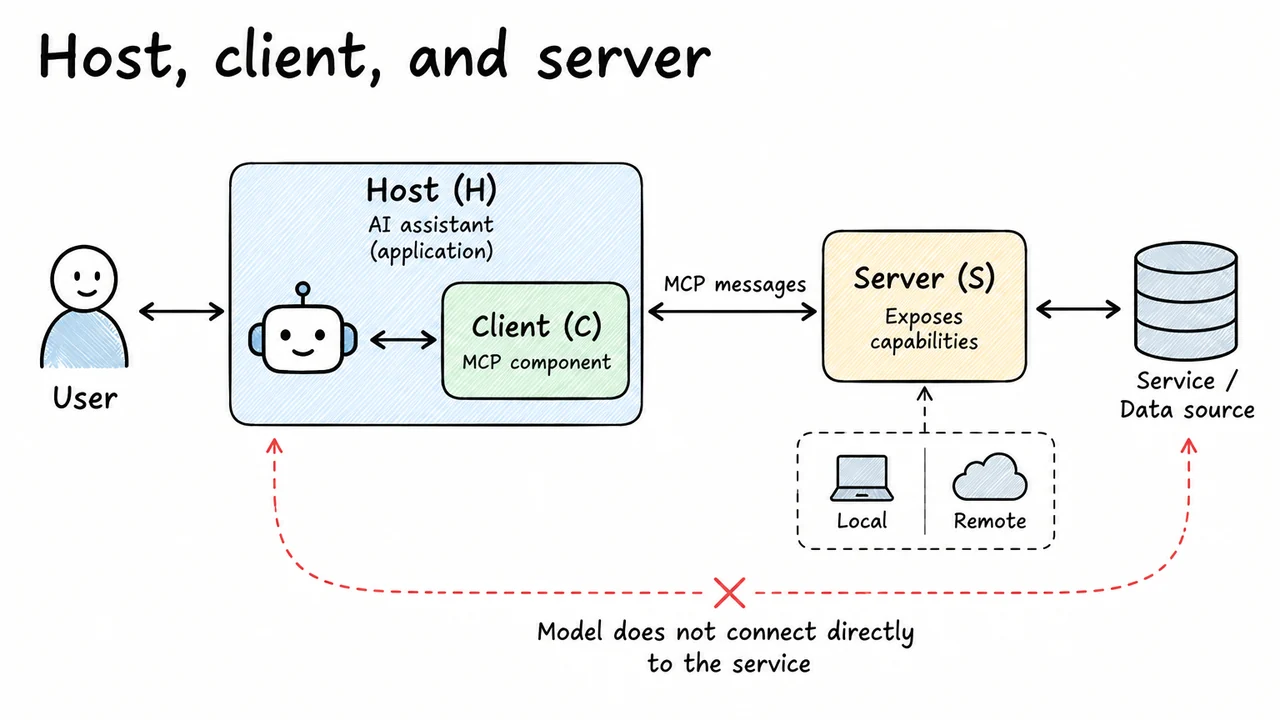
It helps to separate three roles that are easy to blur together. The host is the application the person interacts with, such as an AI assistant. The host manages the overall experience: it receives the user's request, coordinates the model, decides which capabilities are available, and determines how results are presented. In our example, the host is the project assistant that the user chats with.
An MCP client is the component managed by the host that maintains a protocol connection to a server. It handles the MCP conversation: setting up the connection, discovering supported capabilities, and sending requests in the expected format. The client is not the underlying project-management service; it is the part that speaks the shared protocol.
An MCP server exposes capabilities from a particular service, data source, or local system. A document server might let the client find project notes. A task server might expose a tool for creating tasks. Behind the server there may be an ordinary web API, a database, or local code. The server translates the MCP interaction into whatever work the underlying system requires.
The path is therefore host to client to server, and then onward to the service or data source. A server can run locally or remotely depending on the setup. Most importantly, the AI model does not automatically connect directly to every service; the host coordinates what the model can request and what the application actually allows.
MCP servers can expose different kinds of capabilities, and knowing the difference helps us reason about what an assistant is allowed to do.
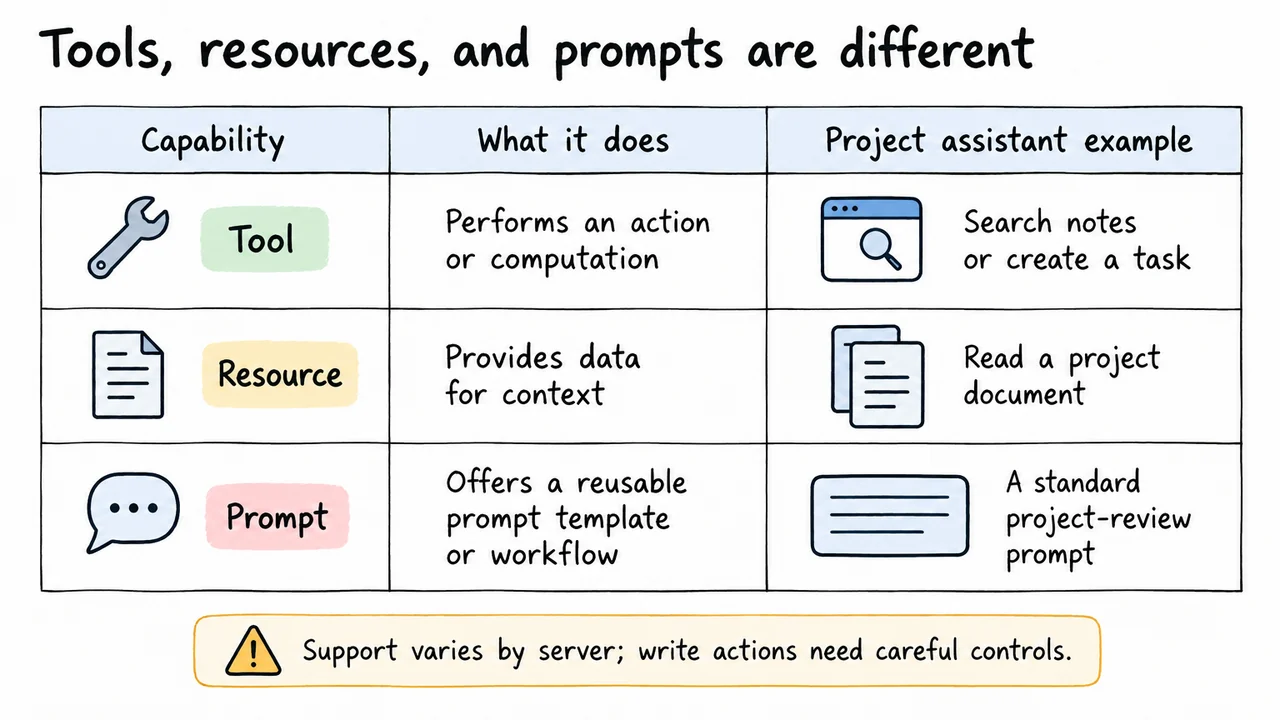
A tool is something the application can call to perform an action or computation. In the project assistant, a tool might search project notes or create a follow-up task. Tools can have inputs, such as a task title or a query, and return results or errors. Because a tool may change external state, the host should apply suitable authorization and approval rules before running consequential actions.
A resource provides data that the application can retrieve as context. A project document, a record, or a file-like item could be exposed as a resource. Resources are useful when the assistant needs information to answer a question or decide what to do next. Reading a resource can still reveal sensitive information, so access controls matter even when nothing is being changed.
A prompt is a reusable prompt template or workflow offered by a server. For example, a project system might provide a standard template for reviewing a decision log. It can help a host or user start a task in a consistent way, but it is not the same as executing an external action.
These categories describe different purposes: tools do things, resources provide data, and prompts package reusable instructions. A server may support one category or several, and not every host supports every feature in the same way.
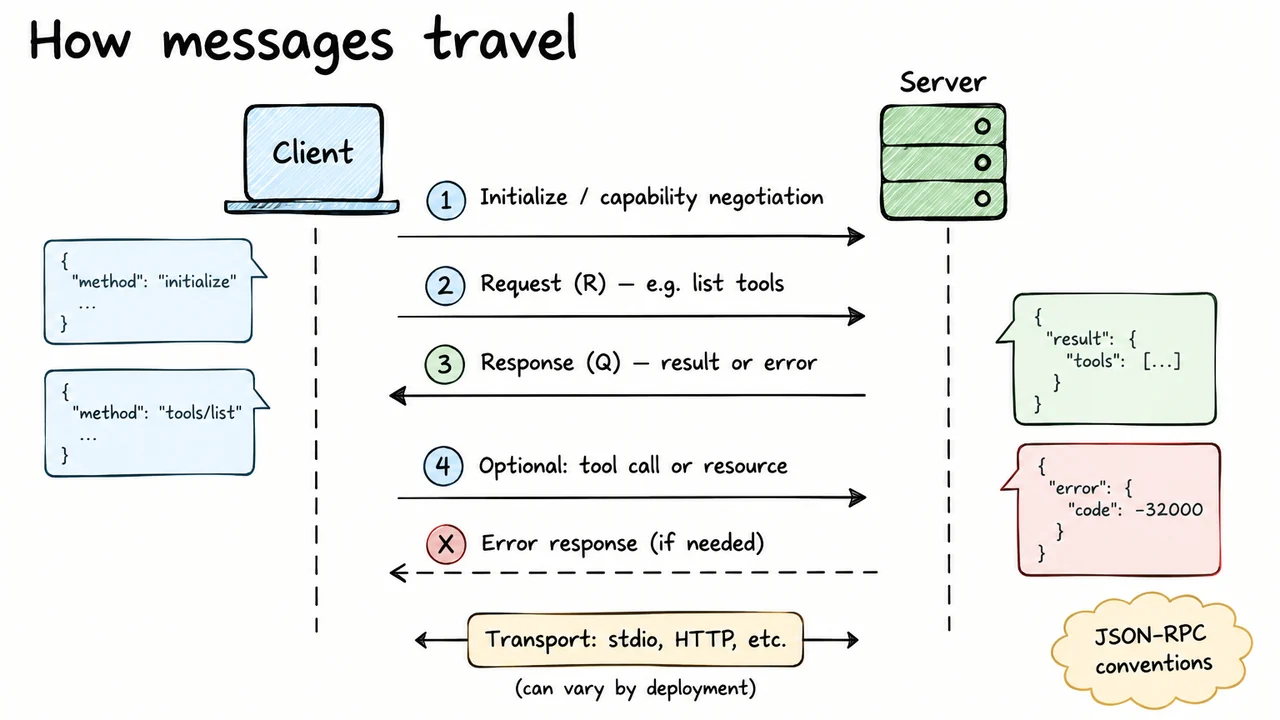
The client and server exchange structured messages, commonly using JSON-RPC conventions. A request names an operation and supplies any required inputs; the corresponding response carries a result or an error. For a simple mental model, we can write the exchange as:
Here, means a request sent to the server , and means the returned response or result. These letters are just shorthand for the flow, not literal MCP message fields.
When the client first connects, it initializes the session and learns which capabilities the server supports. It can then discover tools or access resources that are available. A request might ask for a list of tools; a later request might call one of those tools with arguments. If the operation fails, the response can communicate an error rather than a successful result.
This setup is useful because clients should not assume every server offers every possible capability. They learn what is available and interact through the defined message format. The transport used to carry messages can vary by deployment, so the important point is the shared request-response pattern rather than a single physical connection style.
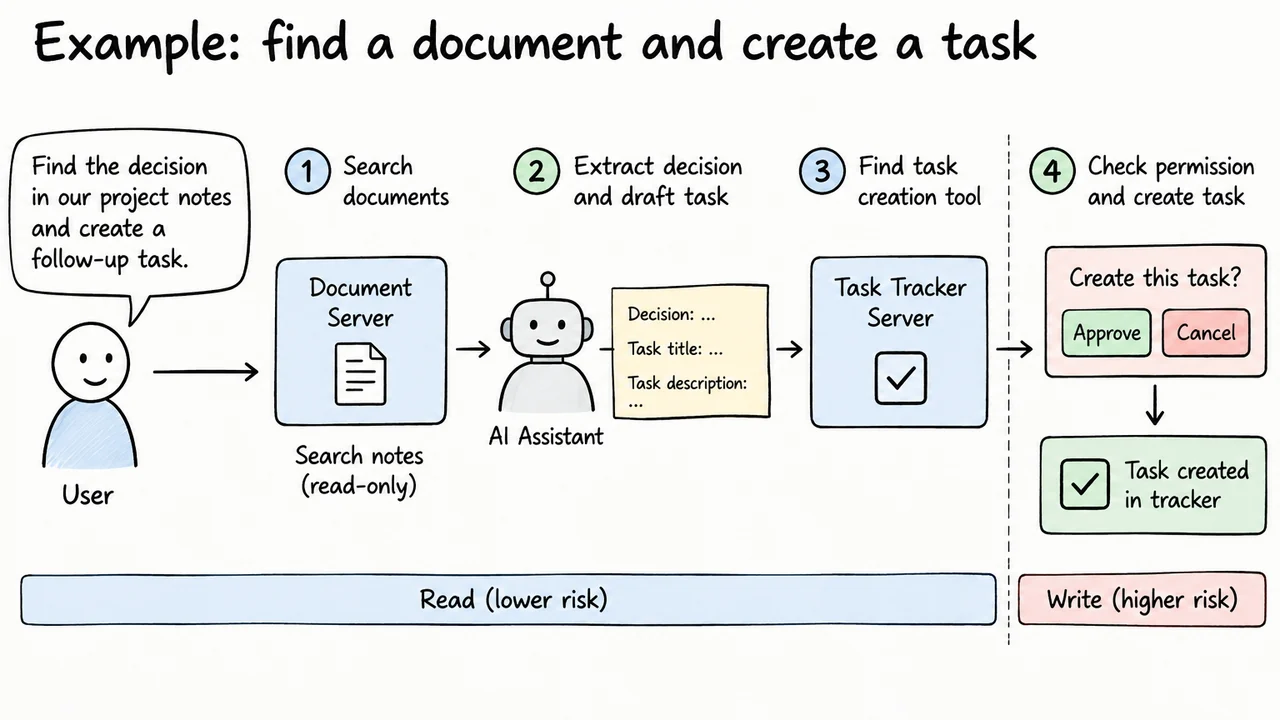
Return to the request: “Find the decision in our project notes and create a follow-up task.” The assistant must first learn what the connected systems can do. A document-oriented MCP server might expose a resource for a project document, or a search tool that accepts a query. Which route is available depends on that server's implementation.
The host can use the retrieved notes as context for the model to identify the relevant decision. The model might then draft a concise task title and description. But finding the information and creating the task are different operations: the first retrieves data, while the second changes an external system. Treating them as separate steps makes it easier to apply the right permissions to each one.
Next, the host needs access to a task-creation capability, perhaps from a separate task-tracker server. The client can discover the tool and its expected arguments. The host can check whether the user is allowed to create tasks and, depending on its policy and the consequences, ask the user to confirm the proposed action.
If approved, the client sends the tool call and the server attempts to create the task through its underlying service. The server returns a result or an error, which the host uses to report what happened. This is the value of tracing the interaction step by step: the assistant's language understanding is only one part of the workflow; the surrounding application still controls access and verifies outcomes.
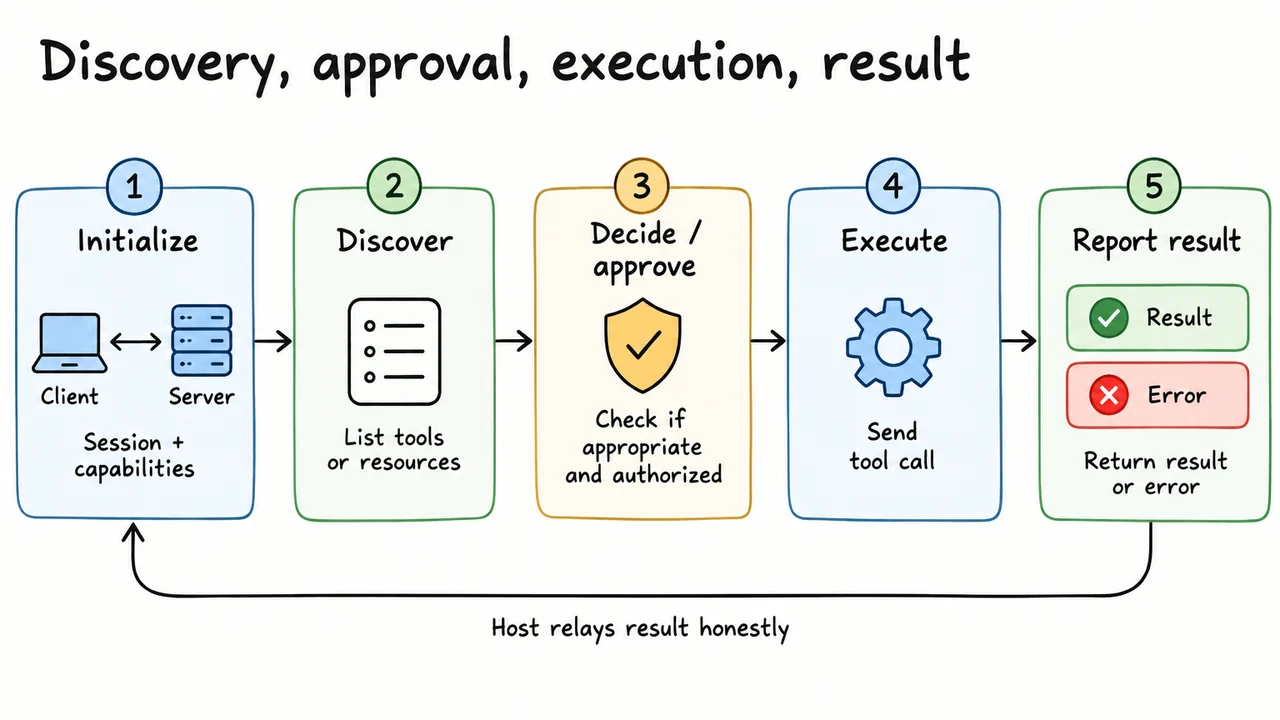
A typical interaction is easier to trust when we separate it into distinct stages.
This order is not just ceremony. Discovery helps the client learn what the server actually offers rather than guessing. The decision stage keeps capability availability separate from permission: a tool can exist without every user or every request being allowed to use it. Execution can fail because of invalid input, network problems, or the underlying service, so the result must be checked.
The host should never say “Task created” merely because it sent a request. It should say that only when the returned result supports that claim. If the operation fails or the outcome is uncertain, the assistant should report that honestly and, where useful, explain what can be tried next.
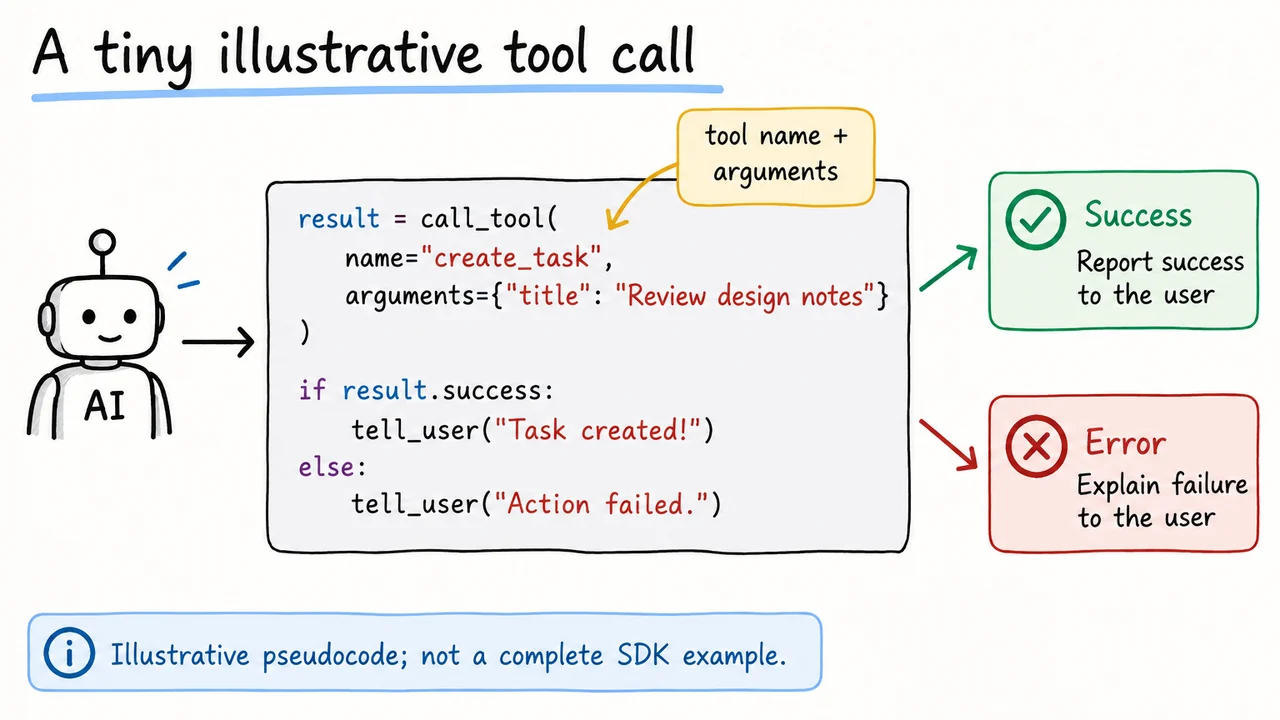
Here is a deliberately simplified picture of a tool call:
result = call_tool(
  name="create_task",
  arguments={"title": "Review design notes"}
)

if result reports success:
    tell the user the task was created
else:
    explain that the action failed
The call names the capability and supplies arguments. In a real MCP integration, the client would first establish a session and discover the available tool and its input schema. That schema matters: a server may require a title and description, allow an optional due date, or use entirely different field names. Guessing the shape can produce invalid requests or unintended behavior.
The example is pseudocode, not a runnable SDK snippet. A real implementation needs the appropriate client library, connection setup, error handling, argument validation, and authentication. Before the call runs, the host also needs to enforce the relevant permission policy and ask for confirmation if the action warrants it. The server may still reject the operation if the underlying service refuses it.
Finally, the host must inspect the result. A sent request is not proof of a completed task. Treating success and failure as separate branches keeps the assistant's response tied to what the system actually did.
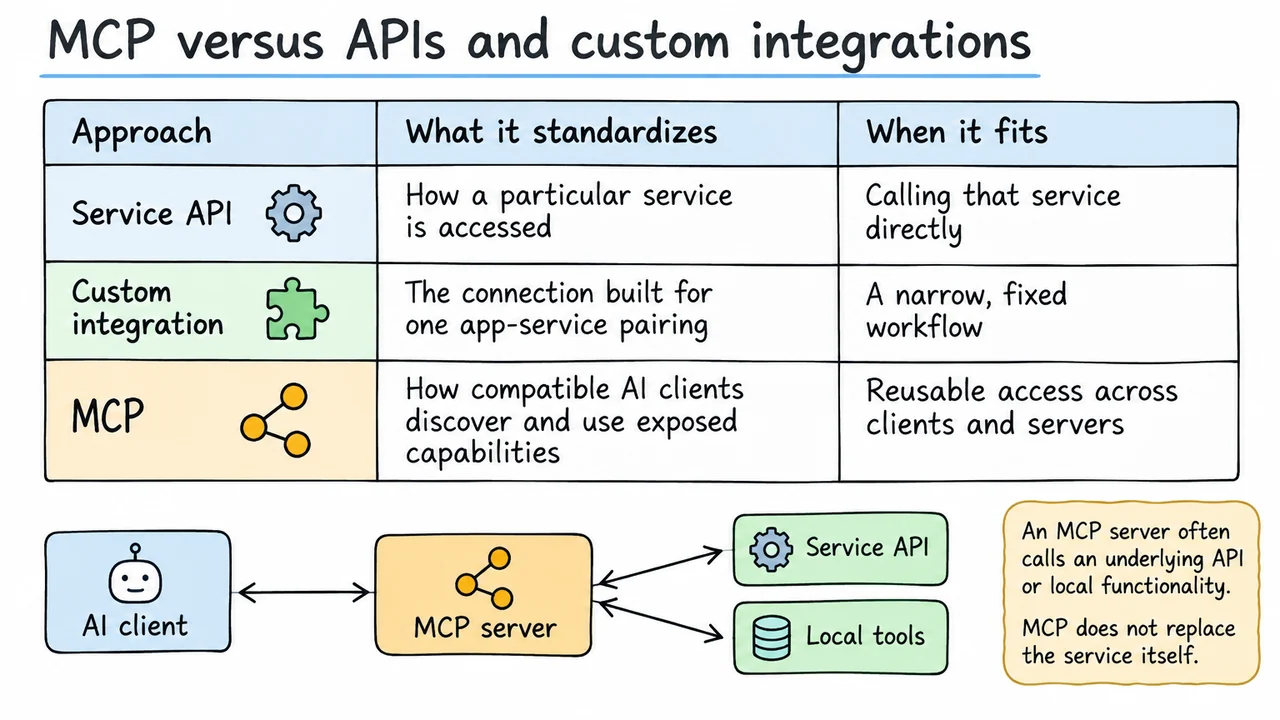
MCP and APIs are related, but they answer different questions. An API defines how a particular service can be accessed: which operations it supports, what inputs they require, and what data it returns. A task tracker might have an API for creating tasks, assigning owners, and listing projects. Developers can call that API directly without MCP.
A custom integration is the code that connects one application to one service. It may call the service API, handle authentication, transform responses, and expose the result to the application. For a single fixed workflow, this can be perfectly reasonable. It may even be the simplest option when there is no need to reuse the connection elsewhere.
MCP standardizes how compatible AI applications discover and use capabilities exposed by an MCP server. That server often uses the underlying API or local functionality to perform the requested work. The service API still exists; MCP adds a shared interaction layer between the client and the server.
The difference matters when several AI applications need access to similar capabilities. Instead of each app implementing its own protocol-specific connection to the service, a reusable MCP server can expose the capability through a common interface. This only pays off if the hosts and servers are compatible and the reuse is valuable. MCP is not automatically better than a direct API call; it is a way to reduce one kind of integration duplication.
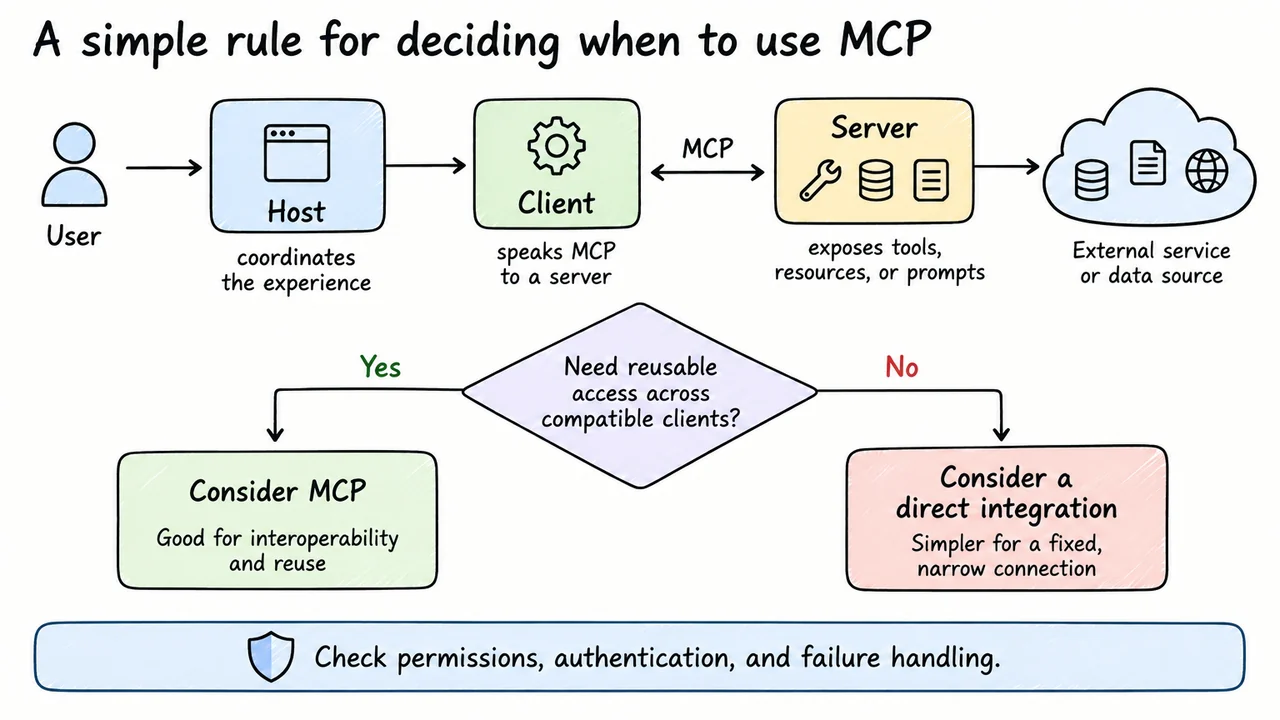
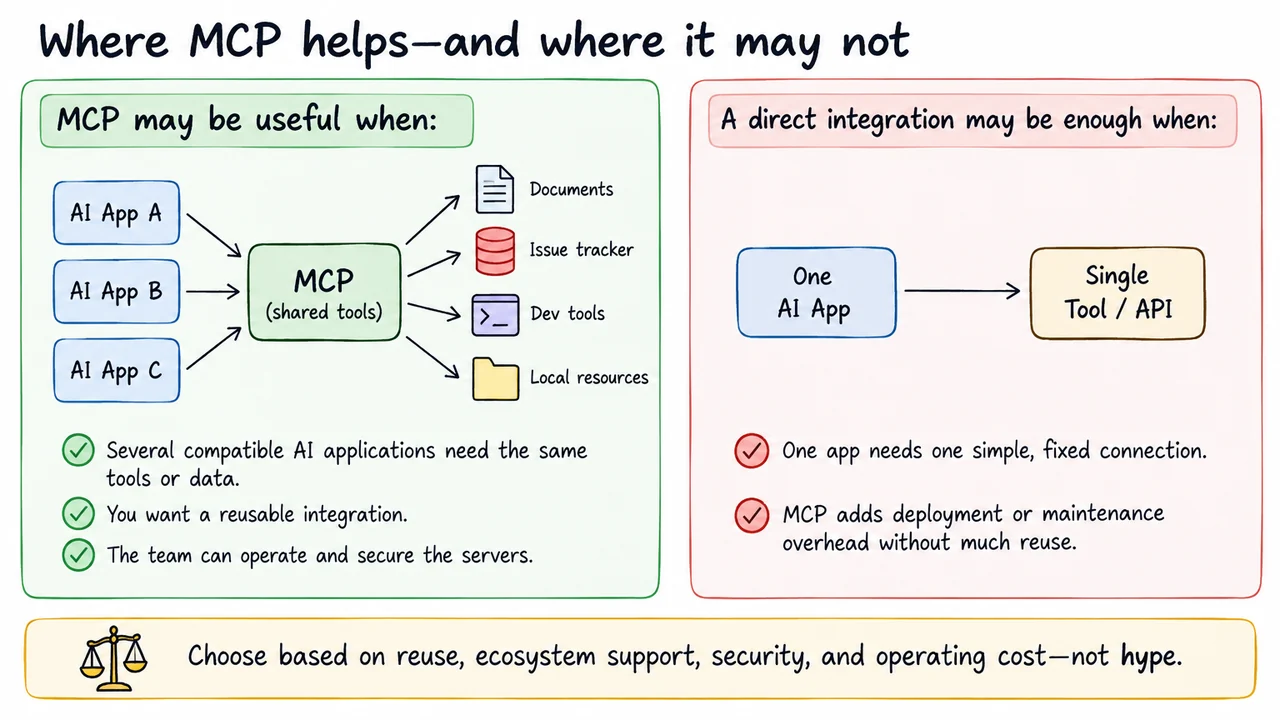
MCP is worth considering when you want the same capabilities to be reusable across compatible AI applications. A team might expose project documentation, issue tracking, developer tools, or selected local resources through MCP servers, allowing different hosts to discover and use those capabilities through a shared interaction pattern. The value grows when the integration can be maintained once and used in several places.
The project assistant is a good example if multiple assistants need the same document search and task creation features. A shared server can reduce the need to recreate the same communication layer for each assistant. The underlying system still needs its own service-specific implementation and permissions, but clients can reuse the standard protocol-facing part.
A direct integration may be the better choice for a single, narrow workflow. If one internal app needs to call one API once, adding an MCP server may introduce another component to deploy, secure, monitor, and maintain without much reuse in return. The decision should account for the team's existing infrastructure, supported clients, expected changes, and the cost of operating the connection over time.
So the practical question is not “Should everything use MCP?” It is “Will a shared interface save enough duplicated work to justify the extra layer?” If the answer is yes, MCP may be useful. If the workflow is fixed and simple, direct integration can remain the clearer solution.
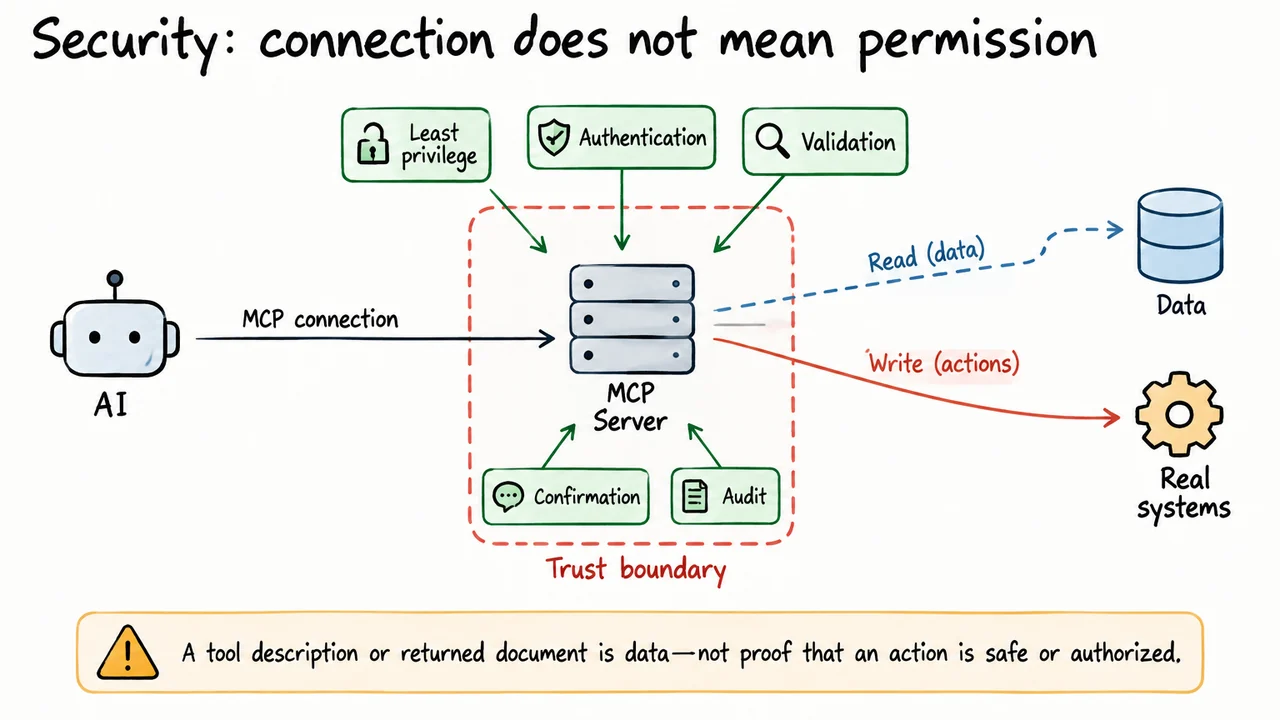
A server connection can expose useful capabilities, but it can also create access to sensitive data or actions that change real systems. Treat each server as a trust boundary: understand who operates it, what it can reach, and which credentials it uses. A compatible protocol does not establish that the server is trustworthy or that every action it exposes should be available to every user.
Start with least privilege. Give the server only the credentials and access it needs, protect secrets, and avoid sharing broad personal or administrative tokens when narrower permissions are possible. Remote connections should authenticate their peers and use an appropriate secure transport. Inputs should be validated, and the server should check permissions before passing an operation to the underlying service.
It is also useful to separate read access from write access where the environment allows it. Searching project notes and creating a task have different consequences. For actions that are consequential, hard to reverse, or externally visible, the host may need to show the proposed action and ask for confirmation. Important operations should be logged so that a team can investigate what happened.
Finally, treat returned documents and tool output as untrusted data. A document might contain instructions that try to manipulate the assistant, but those instructions do not grant authority to override the host's policies. Security comes from layered controls—authentication, authorization, validation, approval, and monitoring—not from the fact that a connection uses MCP.
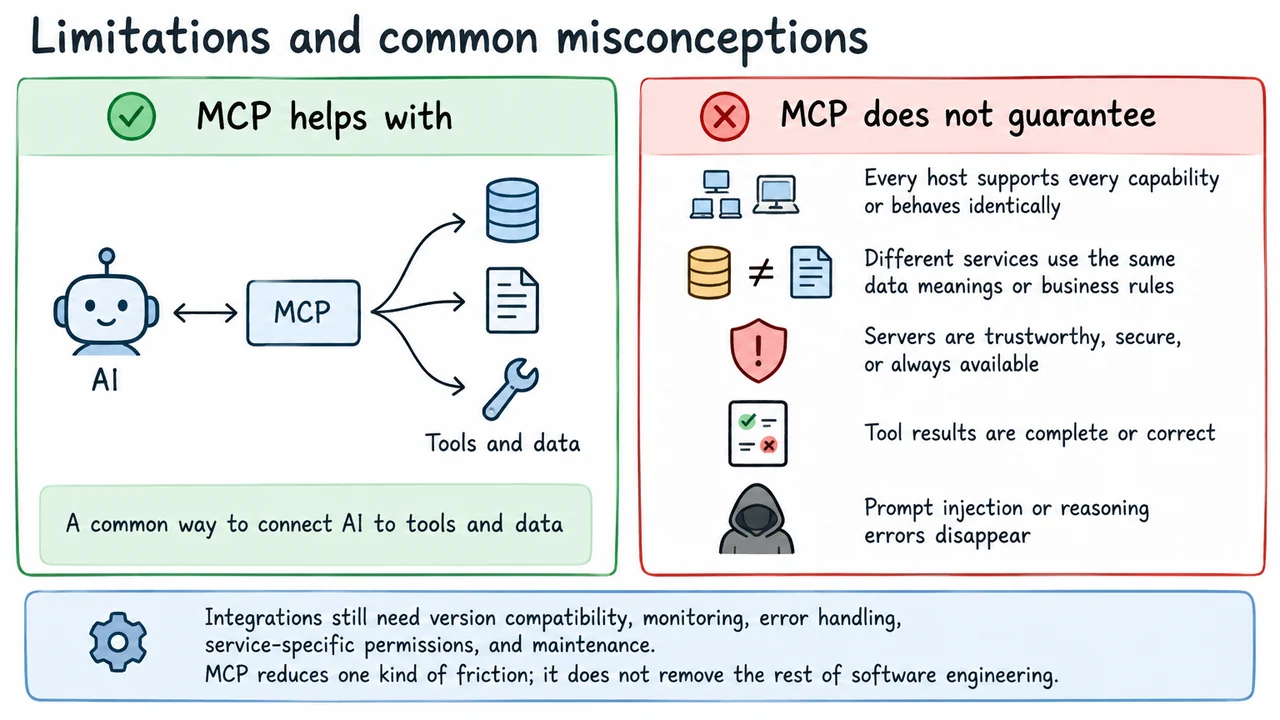
MCP reduces one kind of integration friction, but several limits remain. First, compatibility is not universal. A host may support some MCP features but not others, and a server may expose only a subset of the capabilities a developer wants. Teams need to check the features, protocol versions, and client behavior they actually rely on instead of assuming that every combination works identically.
Second, a common interface does not make services semantically identical. Two task trackers might both offer a tool called “create task” while differing in required fields, project rules, assignment behavior, or error handling. The server must translate the shared interaction into the underlying service's real behavior, and the host should understand enough about the capability to use it responsibly.
Third, servers and services can be unreliable or untrustworthy. Requests can time out, credentials can expire, returned data can be incomplete, and external systems can reject an action. MCP does not solve reasoning errors, eliminate prompt injection, or guarantee that tool results are correct. The host still needs careful result handling and must avoid claiming success without evidence.
In practice, MCP should be treated as one layer in a larger software system. Teams still need monitoring, version compatibility, testing, permission design, error handling, and maintenance. The protocol can make connections more reusable; it cannot replace those engineering responsibilities.
Return to the project assistant. If several compatible AI applications need to search the same project notes and create tasks, a shared MCP server may be worth the effort. If only one small application needs one fixed connection, a direct API integration may be simpler. The decision comes down to how much reuse and interoperability you need, and whether you can operate the connection safely.
Keep the architecture in mind: the host coordinates the user's experience, the client speaks MCP, and the server exposes capabilities such as tools, resources, and prompts. The server may rely on an ordinary API or local functionality behind the scenes. A typical interaction involves initialization, capability discovery, a request, a result or error, and host-side decisions about what is allowed.
Before deploying an integration, verify the capabilities the host and server actually support. Check authentication, least-privilege access, how write actions are approved, how errors are handled, and who maintains the server. Make sure the assistant reports outcomes based on returned results rather than assuming a request succeeded.
MCP is useful when a common interface meaningfully reduces duplicated integration work. It is not a requirement for every AI application, and it does not make security or service-specific behavior disappear. Think of it as a shared language for compatible components—and evaluate it with the same care you would apply to any other software dependency.